
CozyWorld guide
Coloring Games for Adults: 11 Calm Picks
Coloring games with grown-up pictures and no one hovering: three free browser games from CozyWorld, from pixel color by number to cross-stitch patterns, then eight coloring apps and PC games compared.
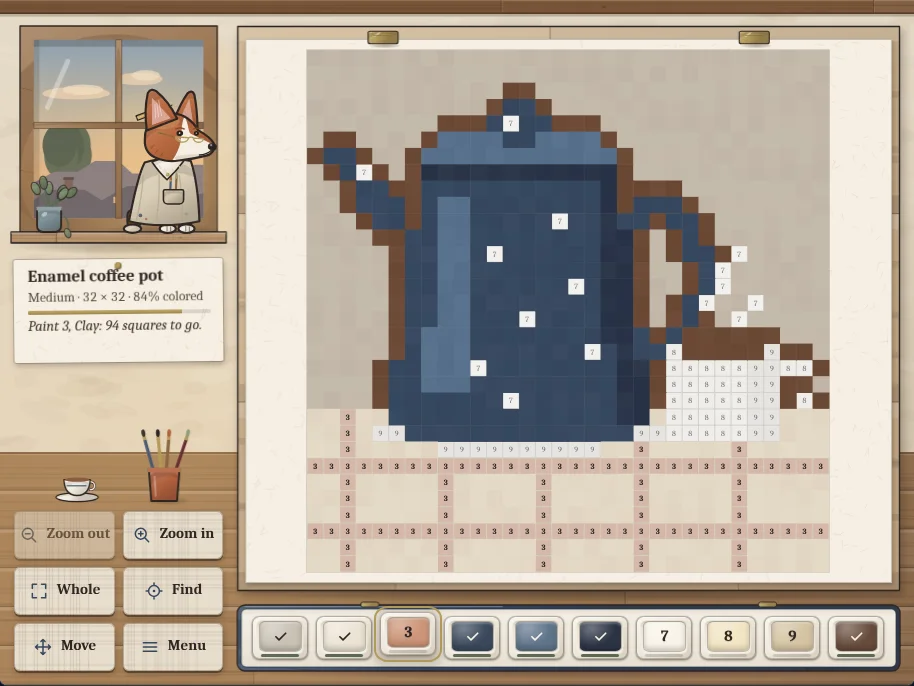
Linseed Loft Color by Number gameplay screenshot: a 32 by 32 picture of an enamel coffee pot, 84% colored, pinned to the drafting board with its blue body filled in and the numbered squares of the table below still waiting, Clement the corgi in his smock at the loft window, the zoom buttons on the left and the tin of numbered paints along the bottom.
The best coloring games for adults hand you the picture and the palette and ask for nothing else. Three are free in your browser on CozyWorld: Linseed Loft Color by Number for coloring 74 original pixel pictures square by square, Little Stitches for filling a cross-stitch hoop with thread colors, and Paintpot Lane for steering a paint-dipped marble down a painter's lane. For apps and PC games, Happy Color, Pigment, Lake, Recolor, Colorfy, Coloring Pixels, Colorizing and Pixel Art Coloring Book are the ones most worth a look.
Search for coloring games and you mostly land among children's apps and portals with cartoon mascots. The adult side splits into two kinds: color by number, where every square tells you its paint and nothing is left to decide, and free-form coloring books, where you pick the colors for detailed line art. This page covers both and labels which is which.
Linseed Loft Color by Number is the CozyWorld pick to start with. Choose a paint from the tin, then color every square that shows its number, tapping one at a time or dragging across a run. The pictures are still lifes, gardens, a village street at dusk and animals drawn with some dignity, and a square that wants a different paint simply stays as it was, so there is nothing to undo.
The outside games below are described from their official pages and store listings, not from our own play, so check each page for the details that matter to you.
Coloring games for adults compared
Where each game plays, what it costs and what kind of coloring it is, as of November 1, 2026.
| Game | Where to play | Price | Kind of coloring |
|---|---|---|---|
| Linseed Loft Color by Number | Browser (phone, tablet, computer) | Free | Pixel color by number, 74 pictures |
| Little Stitches | Browser (phone, tablet, computer) | Free | Picture logic that fills in with thread colors |
| Paintpot Lane | Browser (phone, tablet, computer) | Free | Paint-matching marble game, not coloring in |
| Happy Color | iPhone, iPad (App Store) | Free with in-app purchases | Color by number, a huge library |
| Pigment | iPhone, iPad (App Store) | Free with in-app purchases, subscription | Free-form adult coloring book |
| Lake | iPhone, iPad (App Store) | Free with in-app purchases, subscription | Illustrated coloring pages by artists |
| Recolor | iPhone, iPad (App Store) | Free with in-app purchases | Coloring book with your own photos |
| Colorfy | iPhone, iPad (App Store) | Free with in-app purchases, subscription | An early adult coloring book app |
| Coloring Pixels | PC, Mac, Linux (Steam) | Free to play, optional paid packs | Pixel color by number on the desktop |
| Colorizing | PC, Mac, Linux (Steam) | One-time purchase, free demo | Color by number, simple and small |
| Pixel Art Coloring Book | PC, Mac (Steam) | Free to play, paid full version | Pixel color by number with a free tier |
Platforms and price models for the outside games come from their App Store and Steam pages, checked November 1, 2026, and can change. PC means Windows. Some of these apps may also be on Android, so check Google Play for your device.
Featured CozyWorld Games
Start with these free browser games if you want a cozy session without a download or an account. Each card says what kind of play it is, so you can pick the one that fits your mood.
Coloring with nothing to decide
Linseed Loft Color by Number
Pixel art color by number at a drafting table in an attic studio. Pick a paint, then tap or drag across the squares with its number. 74 original pictures in three sizes, up to 64 squares a side, from a box of 52 named colors, with pinch zoom, a framed gallery of finished work and a picture of the day. No clock to beat and no penalties.
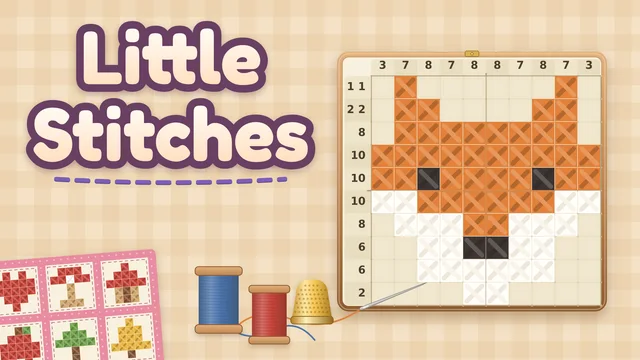
A pattern that colors itself in when you solve it
Little Stitches
A nonogram in a cross-stitch hoop: the counts beside each row and column tell you which squares to stitch, and a finished pattern fills in with thread colors and joins a quilt. 72 hand-drawn patterns from 5x5 to 10x15 in eight quilts, hints that explain each step, and no lives or mistake limit. It asks for a little logic, so it is coloring with a puzzle underneath.
Paint and color without a coloring page
Paintpot Lane
A rolling ball game at a painters' fair, and the honest outlier here: it is not coloring in, it is marble painting. Steer a paint-dipped marble over drops of its own color, around the others and under paint-pot arches that dip it in a new one, and the trail you leave becomes your painting at the finish. 30 levels, a Daily Lane and an endless Long Lane, with gentle, classic and brisk difficulties.
Color by number or coloring book: which one do you want
Color by number takes the choosing out. Every square carries a number, every paint carries the same number, and the pleasure is in watching a picture come up out of gray. That is the appeal of Linseed Loft Color by Number, Happy Color, Coloring Pixels and Colorizing, and it suits an evening when you would like your hands busy and your head quiet. The CozyWorld rules guide to color by number covers how it works in more detail.
A coloring book is the other way round. You get line art, often with intricate patterns, and you choose every color yourself. That is what apps such as Pigment, Lake, Recolor and Colorfy are built around, and it rewards people who like to experiment with a palette. It also asks more of you, which some people find calming and others find a job.
Little Stitches sits between the two. Its patterns are picked out by logic rather than by number, and the colors arrive when you finish, which is a satisfying reward for solving rather than choosing.
What to check before you settle on a coloring app
Most coloring apps are free to download and then ask for money in some way. On their App Store listings, Pigment, Lake, Colorfy, Recolor and Happy Color are all free with in-app purchases, and Pigment, Lake and Colorfy offer subscriptions for their full libraries. That is not a reason to avoid them. It is a reason to open the app, look at what the free tier gives you, and decide before you are handed a paywall in the middle of a picture.
If you would rather not pay at all, the CozyWorld games on this page are free with no account, and Coloring Pixels is free to play on Steam, with paid extra packs. If you prefer to pay once, Colorizing is a one-time purchase with a free demo, so you can try it first.
Quick Picks
The easiest way to choose is to start with the kind of cozy session you want right now: a quick browser game, a longer download, something story-led, or a deeper puzzle or strategy loop. These are the standouts from this guide.
- Coloring with nothing to decide: Linseed Loft Color by Number
- A pattern that colors itself in when you solve it: Little Stitches
- Paint and color without a coloring page: Paintpot Lane
- Color by number on a phone, with a vast library: Happy Color
- A free-form adult coloring book: Pigment
- Illustrated pages by independent artists: Lake
- A coloring book with a big catalog: Recolor
- A classic coloring book app: Colorfy
Choosing between these games
Games were picked for how well they suit a quiet adult evening: pictures you would not be embarrassed to hang up, clear free or one-time pricing, and no race against a clock. Linseed Loft Color by Number is the true color by number game, Little Stitches colors in as a puzzle reward, and Paintpot Lane is included as the paint-themed outlier and labeled that way.
Apps that lean heavily on cartoon characters and licensed franchises were left out, as were any whose store pages could not be opened to check platform and price.
CozyWorld publishes the featured browser games. The external recommendations are editorial comparisons based on the linked official descriptions, not claims of firsthand playtesting. Check those pages for current price, platform and availability.
The Best Coloring Games and Apps Beyond CozyWorld
Pick 1
Happy Color
Best for: Color by number on a phone, with a vast library
What it is: Happy Color, from X-Flow, describes itself on the App Store as "the world's most popular color-by-number game, with over 50,000 FREE high-quality pictures to discover." It is free with in-app purchases, and the listing shows it for iPhone and iPad.
Why it works here: Choose this when you want to choose the subject as well as the colors. The library is large, so it suits a long-running habit.
Official pagePick 2
Pigment
Best for: A free-form adult coloring book
What it is: Pigment, from Pixite, is an adult coloring book app that its App Store listing says includes "portraits, mandalas, grayscales" and more. It is free to download with in-app purchases, and Premium is a subscription offered weekly, monthly or yearly with a 7-day free trial. The listing shows it for iPhone and iPad.
Why it works here: Choose this when you want line art and your own palette. It is the closest thing here to a paper coloring book.
Official pagePick 3
Lake
Best for: Illustrated pages by independent artists
What it is: Lake: Coloring Book for Adults, from Lake Coloring, calls itself "the award-winning coloring app loved by millions" and offers hand-drawn illustrations by independent artists. It is free with in-app purchases, including subscriptions, and the listing shows it for iPhone and iPad.
Why it works here: Choose this when you like your coloring pages to look like illustrations first, with the coloring second.
Official pagePick 4
Recolor
Best for: A coloring book with a big catalog
What it is: Recolor, from Sumoing, is an adult coloring book app. Its App Store listing quotes Apple saying it is "both relaxing and energizing." It is free with in-app purchases, and the listing shows it for iPhone and iPad.
Why it works here: Choose this when you want a long-established coloring app with a lot of pages to try.
Official pagePick 5
Colorfy
Best for: A classic coloring book app
What it is: Colorfy: Coloring Book Games, from Wildlife Studios, bills itself as the original coloring book on its App Store listing. It is free with in-app purchases, including Colorfy Plus subscriptions, and the listing shows it for iPhone, iPad and iPod touch.
Why it works here: Choose this when you want to see what the genre looked like when it started, and you do not mind a subscription prompt.
Official pagePick 6
Coloring Pixels
Best for: Pixel color by number at a desk
What it is: Coloring Pixels, by ToastieLabs, is "A relaxing coloring by numbers game," according to its Steam page, with over 90 free levels and over 1000 levels in total. It is free to play on Steam for Windows, macOS and Linux, with optional paid level packs.
Why it works here: Choose this when you want a large screen and a mouse for fine squares, and a way to start without paying.
Official pagePick 7
Colorizing
Best for: A small, simple color by number game
What it is: Colorizing, by Andrei Ivashentsev, is described on Steam as a "Coloring by numbers game for relaxation." It is a one-time purchase for Windows, macOS and Linux, and a free demo is available.
Why it works here: Choose this when you want to pay once and be done. The demo means you can check the feel first.
Official pagePick 8
Pixel Art Coloring Book
Best for: Pixel coloring with a free version to try
What it is: Pixel Art Coloring Book, by Peaksel, is free to play on Steam for Windows and macOS, with a separate Full Version sold as paid DLC. Its store page presents it as a simple pixel coloring book for all ages.
Why it works here: Choose this when you want to see whether desktop pixel coloring is for you before you buy anything.
Official pageWhich One Should You Play First?
Start with Linseed Loft Color by Number if you want the calmest coloring on this page, Little Stitches if you like a little logic with your colors, and Paintpot Lane if you want to play with paint more than fill in pictures.
For an app, Happy Color is the color by number library, Pigment, Lake, Recolor and Colorfy are the coloring book apps, and on a computer Coloring Pixels, Colorizing and Pixel Art Coloring Book are the pixel coloring games.
Related guides and roundups
FAQ
Show questions
What are the best coloring games for adults?
For free play in a browser, Linseed Loft Color by Number gives you 74 pixel pictures to color square by square with no timer or account, and Little Stitches fills a cross-stitch pattern with thread colors as you solve it. For apps, Happy Color is a color by number library and Pigment, Lake, Recolor and Colorfy are coloring book apps.
Where can I play color by number online for free?
Linseed Loft Color by Number on CozyWorld is free in your browser, on a phone, tablet or computer, with 74 pictures in three sizes. Coloring Pixels on Steam is also free to play, with over 90 free levels.
What is the difference between color by number and a coloring book?
In color by number, every square shows which paint to use, so you only color. In a coloring book app such as Pigment or Lake, you get line art and choose every color yourself.
Are there coloring games with no ads or subscriptions?
The CozyWorld games on this page, Linseed Loft Color by Number, Little Stitches and Paintpot Lane, are free and need no purchase or account. Colorizing on Steam is a one-time purchase with a free demo, while Pigment, Lake and Colorfy list subscriptions on their App Store pages.
See Also
Logic games where every answer can be reasoned out: nine free browser puzzles from CozyWorld, from nonograms to Minesweeper with no-guess boards, then eight more logic puzzle games from daily web puzzles to The Witness.
Games Like Wordle: 15 Wordle Alternatives to TryFinished today's Wordle in three and want more? Here are the best Wordle alternatives, from the New York Times' own daily games to Quordle, Waffle, Absurdle and Nerdle, plus seven free browser puzzles from CozyWorld.
How to Play Minesweeper: Rules and PatternsMinesweeper is the classic logic puzzle of numbered squares and hidden mines. Here are the rules and the three standard sizes, what the numbers mean, flags and chording, the patterns that solve most boards, what to do when a guess is forced, common mistakes and tips.
How to Play Snake: Rules, Controls and StrategySnake is the classic game where every piece of fruit makes you longer and your own tail becomes the thing to avoid. Here are the rules, the controls, and four strategies, from running along the wall to the loop that fills the whole board, with numbers from our own simulation.