Cozy Classic
Little Stitches
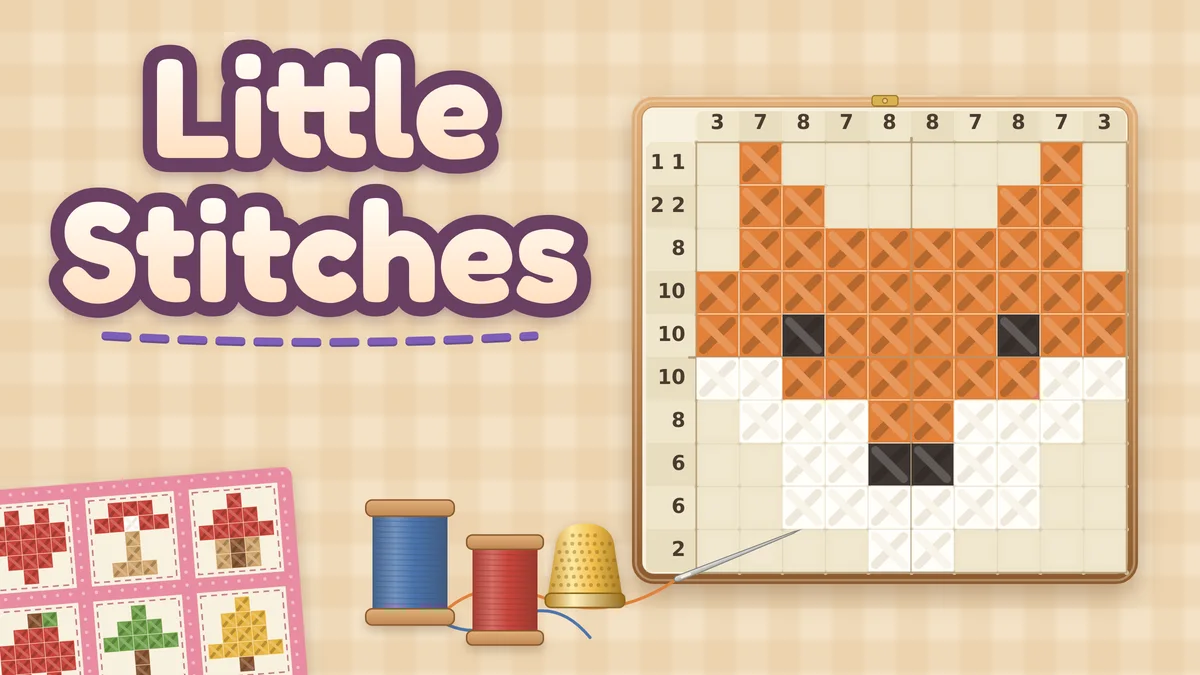
A nonogram (also called griddlers, hanjie or paint by numbers) where the grid is cross-stitch cloth: stitch the squares the counts ask for, and the picture comes back in thread colors.
What you do
A cozy picture logic puzzle with the classic nonogram rules. Each number beside a row or column is a run of stitched squares, in order, with at least one empty square between runs. Stitch the squares the counts ask for, mark the ones that stay empty, and when every count matches, the pattern fills in with thread colors and becomes a square in a quilt. There are 72 hand-drawn patterns in eight quilts of nine: First Stitches teaches the rules on 5x5 patterns, five quilts of 10x10 patterns follow (Tea Time, Sewing Basket, Kitchen Garden, Woodland and Seaside), and two quilts of tall 10x15 patterns end the set (Pets and Pals and Starry Night). Every quilt is open from the start, and each one runs from its easiest pattern to its hardest. Today’s block is a new symmetric quilt block every day, from a set of 365. Every pattern and block has one solution that you can reach one row or column at a time, so no pattern ever needs a guess. Hints explain the next step in a sentence, the clock only keeps your best times, and there are no lives or mistake limits.
How to play
- Press Start stitching on the title card. The first quilt, First Stitches, teaches the rules on small 5x5 patterns, and a short line above the hoop walks you through the first one.
- Each number beside a row, or above a column, is a run of stitched squares in that line, in order, with at least one empty square between runs. A 0 means the line has no stitches.
- Tap a square to stitch it, and tap a stitched square to unpick it. Switch to Cross to mark squares you know stay empty; crosses are only notes for you.
- Press and drag along a row or column to stitch (or cross, or clear) a whole run in one stroke. The first square decides what the stroke does, and a small bubble shows how many squares it covers.
- When a row or column matches its counts, its numbers fade. When every one matches, the pattern is finished: the picture fills in with thread colors and joins its quilt.
- Stuck? Hint explains the next step in one sentence and highlights the squares; press Do it to fill them in. If any of your marks are wrong, the hint says so first and offers to unpick them.
Controls
- Touch: tap a square to stitch or unpick it, and use the Stitch and Cross switch under the hoop to choose what a tap does. Drag along a row or column for a whole run. Undo, Redo, Hint and Quilts sit beside the switch.
- Mouse: left click stitches and right click crosses (when the switch is on Cross, they swap). Click and drag for a whole run.
- Keyboard: arrow keys move the highlighted square, Space or Enter stitches, X crosses, Backspace clears, Z undoes, Y redoes and H asks for a hint. Every button is reachable with Tab, and Escape closes the quilts.
- Toolbar: pause, help, restart (clears the pattern on screen and its clock, and Undo brings it back until your next stroke; records and quilts are never touched), optional sound and fullscreen.
Tips worth knowing
- Start with the biggest numbers. A run of 7 in a row of 10 must cover the middle 4 squares, however far left or right it sits.
- Lines with a 0, and lines whose counts with their gaps add up to the full width, can be filled in straight away.
- Crosses are worth the extra tap: a crossed square is a wall that a run cannot pass, which often settles the squares beside it.
- When a line’s numbers fade, cross the rest of it. Hint does exactly that when it is the simplest step left.
- Hints are free and unlimited. Finish a pattern without one to earn its gold thimble; the thimble stays on your record once earned.
Accessibility
- Everything can be played with a keyboard: arrow keys move a highlighted square, Space or Enter stitches, X crosses, Backspace clears, and every button is reachable with Tab.
- There is no timer pressure, no lives and no mistake limit. The clock only keeps your own best times, and undo, redo and restart are free.
- Stitches and crosses differ in shape and weight as well as color: a stitch is a bold X in thread on a tinted square, a cross is a thin pencil x.
- Strokes, rows and columns that match their counts, hints and the finish are announced to screen readers, and the hoop has a spoken summary of the pattern, the marks so far and the square under the keyboard cursor with its counts.
- Reduced motion shows the finished picture at once instead of filling it in. Sound is optional and never needed to play.
Questions
Does every pattern have one answer, without guessing?
Yes. Every pattern and every daily block has exactly one solution, and it can be reached one row or column at a time, so a guess is never needed. The game’s checks prove this for all 72 patterns and all 365 blocks by solving each one from a blank hoop with line logic alone and replaying the solve to the picture. The same checks follow the hints alone from a blank hoop to the finished picture on every pattern.
How do hints work?
Press Hint and the game explains the simplest next step in one sentence: a row that is 0, a line whose runs are all stitched, runs that fill a line exactly, the squares a long run covers wherever it slides, or what the stitches and crosses already in a line force. The line is ringed and its squares highlighted, and Do it fills them in. If any of your stitches or crosses do not match the pattern, the hint says so first and Do it unpicks them. Hints are unlimited; a pattern finished without one earns a gold thimble.
What does Little Stitches save?
On this device: every pattern you have started (its stitches and crosses, its clock and whether you used a hint), every finished pattern’s best time and gold thimble, today’s block in progress, the last pattern on screen and your Stitch or Cross choice. Your progress saves after every stroke, undo, hint and finish, and when you pause or switch tabs. Today’s block in progress is cleared when the date changes. If the browser blocks saving, you can still play, and the game says your progress lasts only until you leave the page. If saved data ever cannot be read, it is left untouched and kept as a backup when you start fresh.