Cozy Classic
Free Reversi
Starling Hill Reversi
Classic reversi with a dot on every square you can play, the discs a move would turn over shown before you commit, passes handled for you, a friendly computer opponent at three levels, hints with a reason, and undo.
What you do
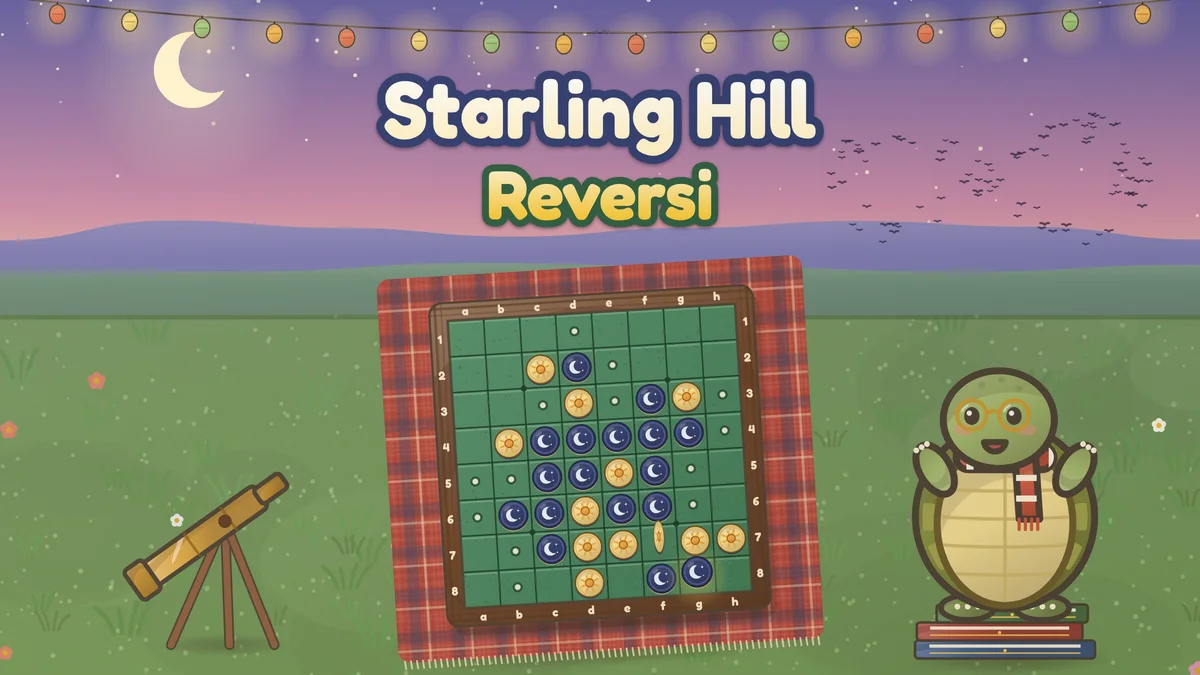
Starling Hill Reversi is reversi with the standard rules, played on a wooden board with green felt squares, set on a tartan blanket at the top of Starling Hill on a clear evening, while a flock of starlings wheels over the far hills and a string of paper lanterns glows overhead. The game starts with four discs in the middle of the board. On each turn a player places a disc so that it traps one or more straight lines of the other side’s discs, and every trapped disc turns over. A player with no move passes, the game ends when neither side can move, and the side with more discs wins. Here each disc has two faces: a deep indigo moon face with a pale crescent and two small stars, and a warm cream sun face with a round orange sun and eight rays, so the two sides differ in pattern as well as color. Your opponent is Tobias, a tortoise in round gold spectacles and a striped knitted scarf, who stands on a stack of old star books beside the board, rubs his chin while he thinks and claps for your good moves.
- Three levels for Tobias: Gentle often plays a square just because he likes it and otherwise grabs the most discs, Steady looks three moves ahead and values the corners, and Sharp searches far deeper and, from 14 empty squares, nearly always plays the rest of the game perfectly.
- A dot marks every square you can play on your turn, and with a mouse or the keyboard the discs a move would turn over are ringed before you commit. The dots can be turned off in Settings for a harder game.
- Every disc a move traps turns over with a short flip, nearest first, so you can see each line that changed. Reduced motion places the discs at once, and the flip speed is a setting.
- Hints from the same search Sharp uses, with a short reason: a corner, a move that leaves Tobias no move at all, one that keeps the corners out of his reach, one that leaves him the fewest moves, or the exact result when the end is near.
- Undo that takes back your move and Tobias’s reply together, a choice of side (moon always moves first) or taking turns, a quick 6 by 6 board, and passes announced and played for you.
- Both disc counts are always on show, beside a stack that grows with each side’s total, and statistics for each level (games, wins, losses, draws and your biggest win) are saved on this device with the game in progress.
How to play
- Press Play. The board has 64 squares in 8 rows of 8. Four discs start in the middle: two moon discs on one diagonal and two sun discs on the other. By default you play moon, and moon always moves first.
- On your turn, tap a square with a dot. A legal move places your disc next to one or more of Tobias’s discs so that a straight line of his discs, across, up and down or diagonally, runs from your new disc to another of yours with no gaps.
- Every disc in every line you trap turns over to your face at once. Only lines that end at the disc you just placed turn over, and a move must turn over at least one disc.
- If you have no legal move, you pass and Tobias plays again; the game passes for you and says so. You may not pass while you have a move.
- The game ends when neither of you can move, usually when the board is full. The side with more discs on the board wins, and equal counts are a draw.
Controls
- Touch or mouse: tap a square with a dot to play there. With a mouse, resting on a dotted square rings the discs that move would turn over. Tapping during a flip finishes it at once. Undo, Hint and Menu sit on the shelf below the board, or beside it on a wide screen.
- Keyboard: the arrow keys move a visible focus around the board (with the move dots on, the discs a move there would turn over are ringed), and Enter or Space plays the square in focus. U undoes, H shows a hint, and Escape clears the hint.
- Restart in the toolbar starts a new game. Menu starts a new game, changes Tobias’s level, your side, the board size, the move dots and the flip speed in Settings, and shows your statistics and the rules. The toolbar also has pause, help, optional sound and fullscreen.
Tips worth knowing
- Take the corners. A disc in a corner can never be turned over, and it becomes an anchor for safe discs along both edges beside it.
- Stay off the squares next to an empty corner, especially the one diagonally next to it. A disc there often hands your opponent a way into the corner.
- Do not grab discs early. Your opponent can only play next to your discs, so a move that turns over many of them usually gives your opponent more choices. In the opening and middle game, prefer moves that turn over few discs and leave your opponent few good replies.
- Count your opponent’s moves. A strong move often leaves the other side only poor squares to play, until they have to give you a corner. The hint marks moves like this when it finds one.
- Be patient on the edges. An edge disc taken early can still be turned over along the edge and can give your opponent a line toward a corner. Edges are strongest when they connect to a corner you own.
- Use the hint and undo to learn. The hint says why a move is good, and undo lets you try the other choice and see what Tobias does.
Accessibility
- Everything can be played with a keyboard: the arrow keys move a visible focus around the board, Enter or Space plays a square, U undoes and H shows a hint.
- Every square is labeled for screen readers with its name (a1 to h8, columns from the left and rows from the top, as the board’s edge letters and numbers show), the disc on it, whether you can play there and how many discs that move turns over. Tobias’s moves and passes are read out in the message line.
- The two sides differ in pattern as well as color: an indigo moon face with a pale crescent against a cream sun face with an orange sun and rays. Each kind of mark on the board has its own shape.
- Nothing is timed. Tobias waits while a menu is open.
- Reduced motion places each disc at once instead of flipping it, stops the pulsing hint and Tobias’s fidgeting, and keeps the sparkles small and still. Sound is optional and never needed to play.
Questions
How strong is each level?
We measured Tobias with our own simulation, with the two sides swapping colors every game. Against a player that picks legal moves at random, Gentle won 541 of 1,000 games (54.1 percent), Steady 999 of 1,000 and Sharp all 200 of 200. Against each other, Steady beat Gentle in 997 of 1,000 games, and Sharp won all 100 of its games against Gentle and all 100 against Steady. These are computer players, not people, so treat the numbers as a guide.
Can a beginner beat Gentle?
Yes, that is what Gentle is for. In the same simulation, a simple scripted beginner that takes a corner whenever it can and otherwise plays the move that turns over the most discs beat Gentle in 767 of 1,000 games (76.7 percent), with 26 draws. The same beginner won 19 of 1,000 against Steady and none of 100 against Sharp, so Steady and Sharp expect you to think about your opponent’s replies.
Which reversi rules does this use?
The standard modern rules: an 8 by 8 board, four discs in the middle at the start with each side’s two on a diagonal, the dark side (moon) moving first, a move that must trap at least one straight line of the other side’s discs in any of the eight directions, every trapped line turned over, a forced pass only when you have no legal move, and the end of the game when neither side can move. The side with more discs wins. Empty squares left at the end count for nobody.
What happens when I have no move?
You pass, and Tobias plays again. The game checks this for you after every move: a tag over your coaster says you pass, and the message line explains it. You never have to press anything to pass, and you can never pass while you still have a legal move. If neither of you can move, the game ends at once, even with empty squares left.
What is the 6 by 6 board?
A quicker game with the same rules on a smaller board: 36 squares, the same four discs in the middle, and about half as many moves. Choose it in Settings under Board. Statistics count games on both boards together for each level.
What does the game save?
Your settings, the game in progress with every move, and your statistics for each level (games played, won, lost and drawn, and your biggest win), all in this browser’s local storage. There is no account.