
CozyWorld game guide · By CozyWorld
This guide covers our own game, written from the current game rules and browser checks.
How to Play Spot the Difference: Rules and Tips
Spot the difference is the puzzle with two nearly identical pictures and a set number of changes to find. Here is how it works, what kinds of differences to expect, why the eye skips over them, and practical ways to scan a picture that come from research on change blindness and visual search.
How do you play spot the difference? You get two pictures that look the same at first glance, and a number: how many things in one picture are not quite the same in the other. Your job is to find every one. A cup might be missing, a cat might be facing the other way, or a clock might show a different time. The rules take a sentence to explain, and the fun is all in the looking.
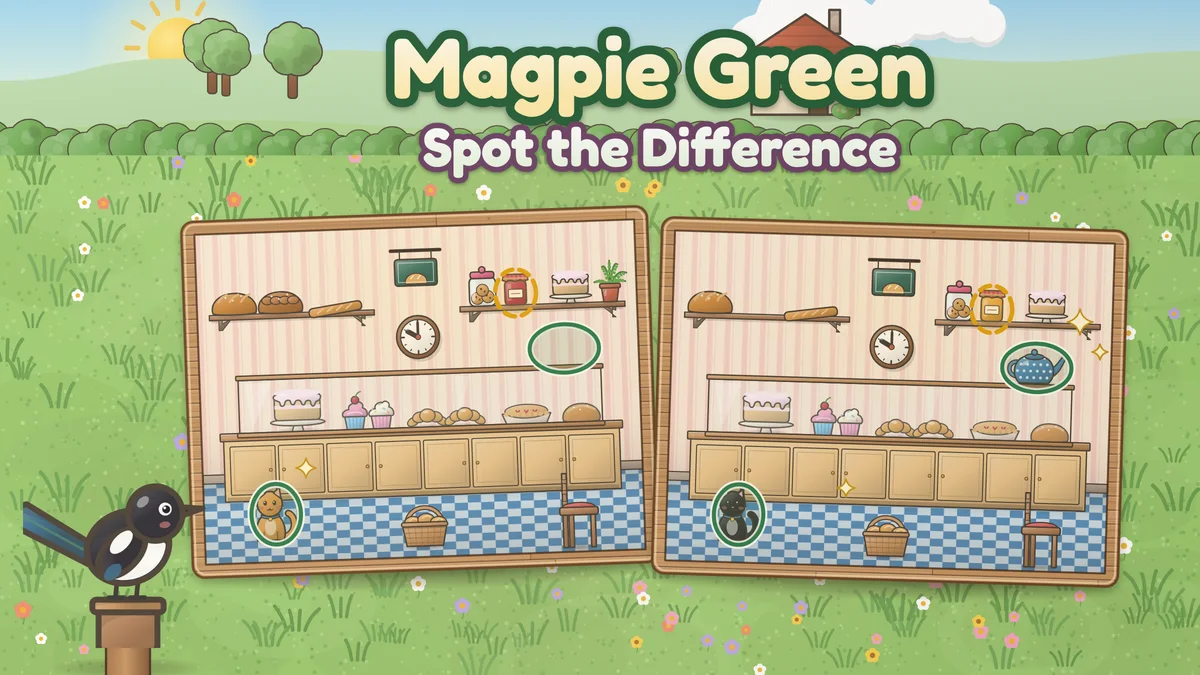
This guide covers the rules, the kinds of differences you will meet, and the controls in Magpie Green Spot the Difference, where you can play spot the difference online free across 30 cozy scenes. Then it explains why some changes are so easy to miss, using research on change blindness and visual search, and turns that research into scanning tips. Facts about the puzzle and about how we see come from the sources named in the text and listed at the end. Every number about the game itself comes from its own scenes or our own simulation of its rules, and each is labeled as such.
What is spot the difference?
Spot the difference is a puzzle in which you look for the small differences between two pictures that are otherwise the same. Wikipedia describes it as a type of puzzle where players must identify subtle differences between two otherwise similar images, and notes that it turns up in activity books for children, in newspapers and in video games. Plenty of people look for it as find the difference, too.
A printed puzzle usually tells you how many differences there are, and the answers are often printed nearby or on an answer page at the back of the book. On a screen, the game checks each tap for you and marks every difference you find.
How to play
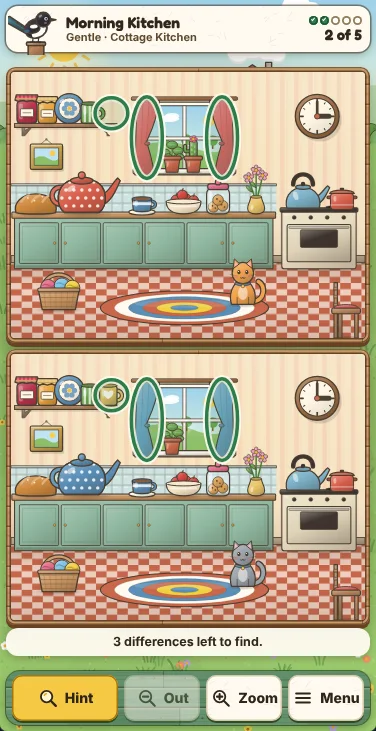
Look at the two pictures side by side (or one above the other on a phone). They show the same scene, but a set number of things in one picture have been changed. Find a difference, mark it, and keep going until you have found them all.
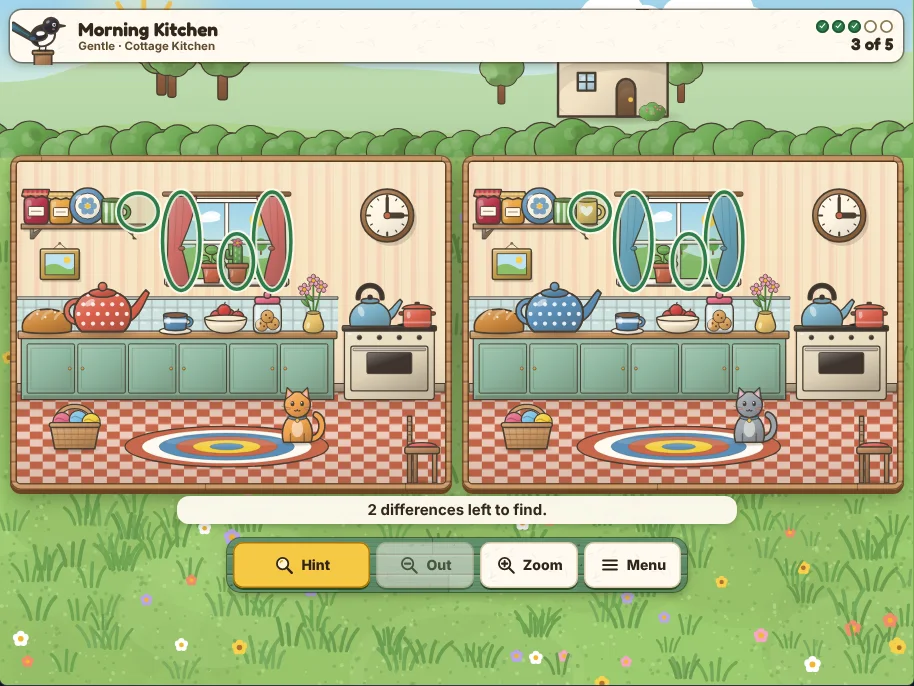
On paper you circle each difference with a pencil, in either picture. In Magpie Green Spot the Difference you tap it in either picture, and a green ring appears around it in both. The dots at the top of the screen fill in as you go, so you always know how many are left.
There is no penalty for taking your time. The clock is off unless you turn it on in Settings, and a wrong tap never ends the scene: it only makes the next hint wait a few seconds longer. If you are stuck, ask for a hint and Margot the magpie circles one of the differences you have not found yet. In Magpie Green the hint is ready again 20 seconds after you use it, and each wrong tap pushes it back 5 seconds, never more than 30 seconds from now.
What counts as a difference
A fair difference is a real change to something in the picture, not a speck of dust or a line that moved by a hair. In Magpie Green every difference is one whole object changed, and the game’s own check renders both pictures and measures each change, so none of them is a single-pixel trick.
The changes fall into a few kinds. Something can change color, such as a teapot that is red in one picture and blue in the other. It can change pattern or detail, such as a clock showing a different time or a cushion with a new pattern. Something can be missing, or be added to only one picture. It can face the other way, grow or shrink, or move to a new spot.
Here is how the 354 differences drawn into the game’s 30 scenes break down, by our own count of the scenes as they ship. Color and pattern changes are the most common, and missing things come next.
| Kind of change | Differences | Example |
|---|---|---|
| A new color | 129 | A teapot turned from red to blue |
| A new pattern or detail | 78 | A clock showing a different time |
| Something missing | 77 | A loaf gone from the shelf |
| Something added | 37 | A teapot on the counter in one picture only |
| Facing the other way | 22 | A kettle with its spout turned round |
| Bigger or smaller | 6 | A pumpkin grown larger |
| Moved | 5 | A hedgehog in a new spot on the grass |
Controls in Magpie Green Spot the Difference
Tap or click a difference in either picture to mark it. Pinch, scroll the mouse wheel, or use the Zoom and Out buttons to zoom in, and drag to look around while zoomed. Both pictures zoom and pan together, so you always compare the same spot. The Hint, Out, Zoom and Menu buttons sit along the bottom of the screen, where a thumb can reach them on a phone.
On a keyboard, the arrow keys move a crosshair over the pictures (hold Shift for small steps), Space or Enter checks the spot under it, H asks for a hint, plus and minus zoom, 0 shows the whole picture again and M opens the menu.
Each scene has three difficulties. Gentle asks for the 5 plainest differences in the scene, Steady for 7 and Sharp for 10, ranked by how much of the picture each one changes. Today’s scene is a different one each day, with 7 differences, and every scene comes round once a month. You earn three stars for a scene finished without a hint and with no more than 3 wrong taps, and each hint or the extra wrong taps cost a star, down to one.
Why differences are easy to miss
If you have ever stared at two pictures and been sure there was nothing left to find, you have met change blindness. It is the name researchers give to the surprising difficulty people have in noticing a change in what they are looking at. In a well-known experiment by Rensink, O’Regan and Clark (1997), a picture and a changed copy of it were shown in turn with a blank screen between them, the flicker paradigm, and it usually took people a while to notice the change, even when they had been told to look for one.
The same work found that changes to the important parts of a picture are noticed faster than changes to areas of less interest. A later study by O’Regan, Rensink and Clark (1999) found that scattering a few small, high-contrast splashes over a picture at the moment of the change was enough to hide it. Busy patterns and bright spots in a scene may pull the eye away in a similar way.
Things that appear and things that disappear are not equal, either. Cole, Kuhn and Liversedge (2007) found that the appearance of an object is more resistant to change blindness than its disappearance: a new object tends to be noticed, while a missing one is easier to overlook. Research summarized by Wikipedia also links attention to the effect, with Smith and Schenk (2008) reporting that shifts of attention reduce change blindness. In short, you tend to see a change when you are looking right at the thing that changed.
Age plays a part as well. Veiel, Storandt and Abrams (2006) found that older people were slower to detect changes in a change blindness experiment than younger people. That is one reason Magpie Green has no time limit unless you ask for one.
How your eyes search a picture
Research on visual search explains why some differences jump out while others need hunting for. In feature integration theory, introduced by Treisman and Gelade in 1980, something that differs from its surroundings by a single feature, such as one red cup among blue ones, pops out, and how quickly you find it hardly depends on how many other things are around it.
A conjunction search, where the target only differs in a combination of features, works differently: as the number of distractors grows, finding the target takes longer and mistakes become more likely. Many spot the difference changes are like this, a new pattern on one cushion among several, so a busy shelf really is harder than an empty wall.
Visual search also changes with age. Wikipedia’s summary notes that performance on conjunction search improves through childhood and declines in later life, and Lorenzo-López and colleagues (2008) found that older adults had slower reaction times in conjunction searches than young adults. The good news, also from the research Wikipedia summarizes, is that practice helps: Reavis, Frank, Greenlee and Tse (2016) reported that the slower times of conjunction search tend to improve with practice.
Scanning tips that work
Compare small areas, one at a time. Because change blindness fades when your attention is on the thing that changed, pick one small area, say the top shelf, and compare it object by object in both pictures before moving on. Sweeping your eyes over the whole scene at once leaves most of it unattended.
Look for gaps as well as changes. A missing object is easier to overlook than an added one, so ask what should be there as well as what is there. Count the small groups in both pictures: loaves on a shelf, apples in a bowl, birds on a fence.
Check the plain colors first. A single object in a new color can pop out across the whole picture, so a quick pass for color often finds the easiest few. Then slow down for patterns and small details, which need a closer look.
Give busy corners extra time. Shelves, quilts and market stalls are full of similar objects, the kind of search that slows down as the clutter grows. Zoom in on them, since zooming both pictures together turns small details into large ones, and work through them piece by piece.
Take a break when you are stuck. The game saves your scene as you go, so you can come back to it with fresh eyes. Wikipedia also describes crossing your eyes so that the two pictures merge into one, a trick some solvers use on printed puzzles. It does not suit everyone, and you never need it here.
Save the hint for the end. Margot circles the plainest difference you have not found, so a hint used early often shows one you would soon have spotted. Using one costs a star, which matters only if you are collecting them.
How fair are the differences?
A spot the difference puzzle is only fun when every difference can be found. Magpie Green checks this for every scene with its own regression test. It renders each scene with each difference alone and measures the pixels that change: each difference must change at least 140 clearly different pixels at the scene’s own size of 400 by 300, its biggest patch must be at least 8 units across, it must stay inside the picture, it must not overlap any other difference’s tap area, and it must be the only change in its spot.
The table shows how large the differences in play are at each difficulty, by the game’s own measurement. A tap counts anywhere in a box at least 22 units across around each change, with a little more allowance for a fingertip than for a mouse, and zooming makes everything larger.
| Difficulty | Differences in play | Smallest (changed pixels) | Median (changed pixels) | Median size across |
|---|---|---|---|---|
| Gentle | 150 | 305 | 629 | 33 units |
| Steady | 210 | 215 | 522 | 30 units |
| Sharp | 300 | 165 | 434 | 27 units |
Does tapping at random work?
Not well, and the game is built so that it never needs to. We ran our own simulation of a player who never looks: a tap at a random spot every 1.5 seconds of play, taking a hint the moment one is ready, over 600 scenes at each difficulty. Each wrong tap pushes the next hint 5 seconds further away, up to 30 seconds, so a stream of random taps keeps the hint out of reach.
The blind player did finish every scene in the end, but with dozens of wrong taps, and it earned one star in all but one of the 1,800 scenes. Three stars need no hints and no more than 3 wrong taps, so only looking earns them.
| Difficulty | Blind taps that found something | Wrong taps per scene | Average time | Stars |
|---|---|---|---|---|
| Gentle | 7.7% | 42.1 | 1.4 minutes | 1 star in 599 of 600 |
| Steady | 8.5% | 51.2 | 1.8 minutes | 1 star in all 600 |
| Sharp | 10.5% | 53.6 | 2.2 minutes | 1 star in all 600 |
Related games
If you enjoy careful looking, try Grandma’s Attic Search, a hidden object game where you zoom into a painted attic to find keepsakes from their shadows. Cottage Word Search hides words in a cozy letter grid, and Rainy Day Jigsaw turns a picture into pieces to put back together at your own pace.
Sources
Wikipedia, “Spot the difference” (definition, where the puzzle appears, answer pages and the crossed-eyes method), citing Lin, Chen and Wang (2021), “Visual Performance Assessment of Videos: A Case Study of the Game Spot the Difference,” Applied Sciences 11(16), 7628.
Wikipedia, “Change blindness,” summarizing Rensink, O’Regan and Clark (1997) on the flicker paradigm and on changes to important areas; O’Regan, Rensink and Clark (1999) on mudsplashes; Cole, Kuhn and Liversedge (2007) on appearing and disappearing objects; Smith and Schenk (2008) on attention; and Veiel, Storandt and Abrams (2006) on age.
Wikipedia, “Visual search,” summarizing Treisman and Gelade (1980) on feature integration theory, feature search and conjunction search; Lorenzo-López and colleagues (2008) on older adults; and Reavis, Frank, Greenlee and Tse (2016) on practice.
Magpie Green Spot the Difference: the counts of differences and their sizes come from the game’s scenes and its regions file, measured by scripts/magpie-green-spot-the-difference-regions.mjs; the blind tapper figures come from our simulation, scripts/magpie-green-spot-the-difference-sim.mjs, which runs the game’s own rules.
Keep playing
Spot the difference rewards a steady, patient way of looking: compare a small area at a time, check what is missing as well as what changed, and count the little groups. Start a scene on Gentle to get a feel for the kinds of changes Margot makes, then try Steady and Sharp, and come back for today’s scene each day. For more calm puzzles, try Grandma’s Attic Search, our hidden object game in a painted attic; Cottage Word Search, with words hidden in a cozy grid; or Rainy Day Jigsaw, for a slow picture to piece together.
- Play Magpie Green Spot the Difference
- Magpie Green Spot the Difference: features, controls and FAQ
- Grandma’s Attic Search: a hidden object game in a painted attic
- Cottage Word Search: words hidden in a cozy grid
- Rainy Day Jigsaw: calm picture puzzles
- The best cozy hidden object and search games
More guides and roundups
Match mahjong tiles, solve sudoku and killer sudoku, slide 2048 tiles, stitch a nonogram, find hidden words, fit a jigsaw, rake leaf piles, sort shells, merge fruit or crack firefly codes. Choose a puzzle by the decisions it asks you to make.
Word Search for Adults: Cottage Word Search TipsCottage Word Search is a free word search for adults with a saying hidden in every grid. Here is how selection works, what makes a word search easy or hard, how to scan in every direction, where the fall puzzles are and how the four seasonal books grow.
Free Online Games for Seniors and Older AdultsFree online games for seniors and older adults: solitaire, mahjong, word search, sudoku, jigsaw and nonograms that open in a browser, with no countdown, no accounts and no purchases. Here is how the eight compare on round length, timers and help.
How to Play Tangram: Pieces, Rules and TipsA tangram is seven flat pieces cut from one square, and the puzzle is to fit all seven into a given outline. Here are the pieces and their sizes, the rules, how to cut a set from paper, how the puzzle reached the world, and the solving habits that matter most, with numbers from our own simulation.