Cozy Puzzle
Free Spot the Difference
Magpie Green Spot the Difference
Spot the Difference with 30 hand-built cozy scenes in six packs, 5, 7 or 10 differences to find, a new daily scene, zoom for small screens, and a hint that circles one difference without ever ending the game.
What you do
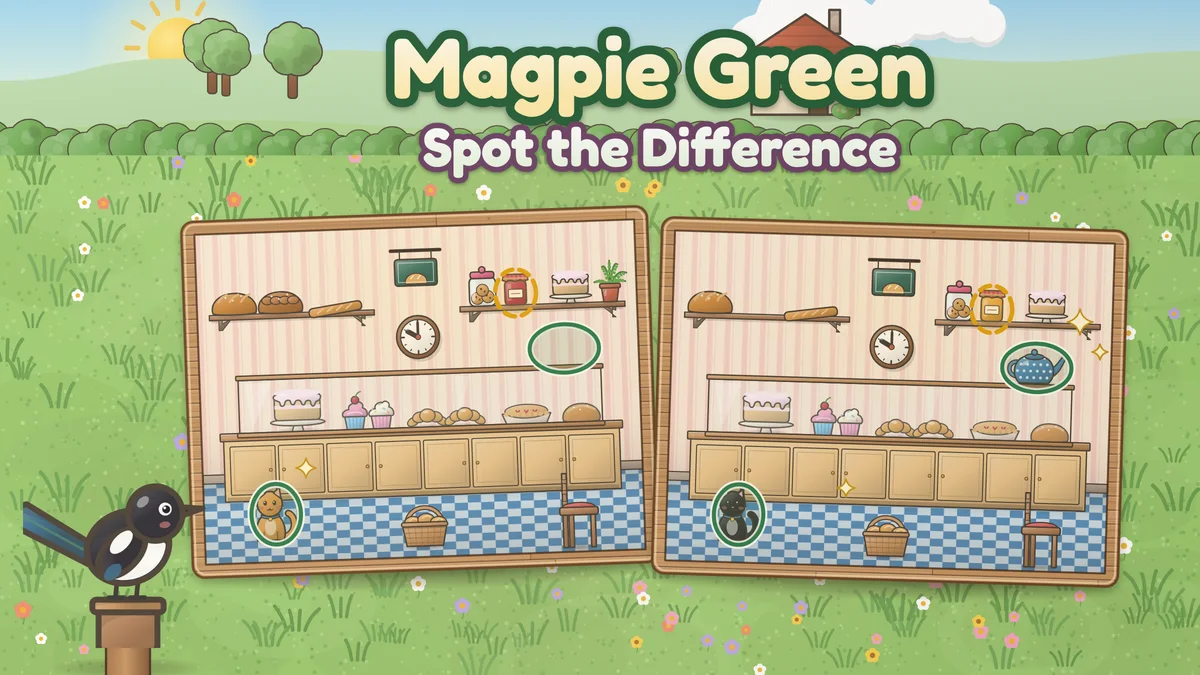
Magpie Green Spot the Difference is the classic two-picture puzzle, set on a village green where Margot the magpie keeps watch from a wooden post. Every scene is drawn as a cartoon picture: a morning kitchen with a kettle on the stove, a bakery counter of cakes, a picnic on the meadow, a reading nook, a market day and a snowy morning, among 30 in all. Margot has been busy in one of the two pictures. A teapot has changed color, a cup has gone missing, a cat faces the other way, or a jar has a new pattern. Each difference is one whole object changed, so there are no single-pixel tricks to squint at. Tap a difference in either picture and it gets a green ring in both. A wrong tap never ends the game: it only makes the next hint wait a little longer. Margot is a black and white magpie with a blue-green tail, who tilts her head at a miss and lifts a wing to point when she circles a hint.
- 30 scenes in six packs of five: Cottage Kitchen, Village Bakery, Garden Path, Cozy Rooms, Market Village and Four Seasons, each drawn as a layered cartoon picture with 11 to 14 differences built in.
- Three difficulties: Gentle finds the 5 plainest differences in a scene, Steady 7 and Sharp 10, ranked by how much of the picture each one changes. Stars are kept for every scene at every difficulty.
- Today’s scene: a new scene each day with 7 differences, chosen by the date, so all 30 scenes come round once a month.
- Every difference is one object changed (its color, its pattern, a missing or added thing, which way it faces, its size or where it sits), measured from the pictures themselves so each tap area matches what changed.
- Zoom with a pinch, the mouse wheel or the Zoom and Out buttons, and drag to look around. Both pictures zoom together, so you compare the same spot.
- A hint that circles the plainest difference left, ready again 20 seconds later. Wrong taps push it back 5 seconds each, never more than 30 seconds in all.
How to play
- Press Play the first scene, or Choose a scene to pick a pack and a scene. Today’s scene is on the title card and at the top of the scene list.
- Compare the two pictures. Each has the same scene, but some things in the second are not quite the same: a color, a pattern, a missing cup, a cat facing the other way.
- Tap a difference in either picture. It gets a green ring in both, and the dots at the top fill in. A tap that finds nothing only makes the next hint wait a little longer.
- Stuck? Zoom in for a closer look, or press Hint and Margot circles one of the differences you have not found. Tap inside the circle to claim it.
- Find them all to finish the scene. Three stars for no hints and no more than 3 wrong taps; a hint, or more wrong taps, costs one star each, and every finished scene earns at least one.
Controls
- Touch: tap a difference in either picture, pinch to zoom, and drag to look around while zoomed in. Hint, Out, Zoom and Menu sit on the board along the bottom, in reach of a thumb.
- Mouse or trackpad: click a difference, scroll to zoom where the pointer is, and drag to look around.
- Keyboard: the arrow keys move a crosshair over the pictures (hold Shift for small steps), Space or Enter checks the spot under it, H asks for a hint, plus and minus zoom, 0 shows the whole picture, M opens the menu and Escape hides the crosshair.
- Menu: choose a scene or today’s scene, change the difficulty, clock and speed in Settings, see your statistics and the rules, or start the scene over. The toolbar above the game has pause, restart, help, optional sound and fullscreen.
Tips worth knowing
- Work in strips. Pick one band of the picture, say the top shelf, and compare it object by object before moving down, rather than letting your eyes wander over the whole scene.
- Look for things that are missing as well as things that changed. A gap where a cup should be is easy to read past, so count small groups: plates on a shelf, apples in a bowl, birds on a fence.
- Check colors on the big things first. On Gentle the five differences are the plainest in each scene, and about a third of them are a whole object in a new color.
- Zoom in on busy corners. Patterns on jars, quilts and teacups are drawn small, and zooming both pictures together makes them easy to compare.
- Save the hint for the last one or two. Margot circles the plainest difference you have not found, so a hint used early often shows one you would have spotted anyway, and a scene without hints earns three stars.
Accessibility
- Everything can be played with a keyboard: the arrow keys move a crosshair over the pictures, Space or Enter checks the spot, H asks for a hint, plus and minus zoom and M opens the menu.
- Found differences get a green ring on a white edge in both pictures and fill in a dot at the top, and the hint is a dashed gold circle, so the marks differ by shape and line as well as color. Each find is announced with what changed, such as the teapot’s color.
- Nothing is timed unless you turn the clock on, and a wrong tap never ends a scene. Taps count a little outside each change, more generously for a finger than a mouse, and zoom makes small changes large.
- Reduced motion stops the pulsing hint circle, the ring pop and Margot’s bobbing, and leaves out the sparkles and petals. Sound is optional and never needed to play.
Questions
How many differences are there?
It depends on the difficulty you choose: 5 on Gentle, 7 on Steady and 10 on Sharp, and 7 in today’s scene. Every scene has 11 to 14 differences drawn in, 354 across the 30 scenes, and each difficulty uses the plainest ones first, so Sharp adds the smaller changes that Gentle leaves out. The dots at the top of the screen show how many are left.
Is there a time limit?
No. The clock is off by default and nothing ever runs out. If you turn the clock on in Settings it only shows how long you have taken. Your best time for each scene is kept either way, and the clock stops while the game is paused or a menu is open.
What happens if I tap the wrong spot?
Nothing bad. A small puff shows where you tapped, and the next hint waits 5 seconds longer, never more than 30 seconds from now. More than 3 wrong taps in a scene costs one star, but the scene carries on and every finished scene earns at least one star.
Are the differences fair on a phone?
That is what the game is built around. Every difference is a whole object changed, and the game’s own check renders every scene and measures each difference from the pictures: each one must change at least 140 clearly different pixels at the scene’s own size, sit apart from every other difference, stay inside the picture and be the only change in its spot. A tap counts anywhere in a box at least 22 units across around each change, with a little extra allowance for a fingertip, and you can zoom in on any scene.
How does the daily scene work?
Each day the game picks one of the 30 scenes by the date, with 7 of its differences: two of its four plainest and five more chosen by the date. The scenes come round in a fixed order, so you see every one once a month and neighboring days come from different packs. Your first finish of the day is recorded, and a replay that does better replaces it.
What does the game save?
Your settings, the scene in progress, your best stars and time for every scene at each difficulty, your daily results and your statistics, all in this browser’s local storage. There is no account. If the saved data cannot be read, the game leaves it untouched and offers to start fresh, keeping a copy as a backup.