Cozy Classic
Free Minesweeper
Linden Meadow Minesweeper
Classic minesweeper with the standard rules and sizes, a first dig that always opens a stretch of board, boards a logic solver has cleared without a guess, chording, flags by right-click or long-press, and pinch zoom for Expert on a phone.
Read the full Linden Meadow Minesweeper guide
How to play
- Pick a size and press Play: Beginner (9 by 9, 10 nests), Intermediate (16 by 16, 40 nests), Expert (30 by 16, 99 nests) or Custom. Or play today's meadow, the same 16 by 16 board for everyone today.
- Dig any patch to begin. The first dig is always clear, and so are the patches around it, so it opens a stretch of meadow.
- Each dug patch shows a number: how many nests are in the eight patches touching it, diagonals included. A dug patch with no number has no nests around it, and its neighbors open on their own.
- Use the numbers to work out where the nests are. Flag a patch you are sure holds a nest. The counter on the sign shows the nests left: the total minus your flags.
- Dig a number whose flags are all in place (as many flags around it as its number) to dig every other patch around it at once. This is chording. If one of those flags is wrong, a nest is dug.
- Dig every patch without a nest to survey the meadow. Digging a nest ends the game; you can try the same board again from your first dig, or start a new one.
Controls
- Mouse: click to dig, right-click to place or lift a flag, and click a number (or middle-click it) to chord. When the board is larger than the meadow, drag to move it; Ctrl and the scroll wheel, or a trackpad pinch, zooms.
- Touch: tap to dig and press and hold to flag (a ring fills, then the flag goes down). The Dig and Flag switch on the shelf swaps the two, so a tap flags and a long press digs. Tap a number to chord. Drag with one finger to move a large board, pinch to zoom, and use Fit or Zoom on the shelf.
- Keyboard: the arrow keys move a visible cursor, Space or Enter digs (or flags in Flag mode, and chords on a number), D digs, F flags, T switches Dig and Flag, H shows a hint, plus and minus zoom and 0 fits the board.
- Menu starts a new meadow, opens today's meadow, retries a lost board, and has Settings (size, custom size, no guessing, what a tap does, the clock), Statistics and the rules. The toolbar has pause, help, optional sound, fullscreen and restart, which starts a new meadow.
What you do
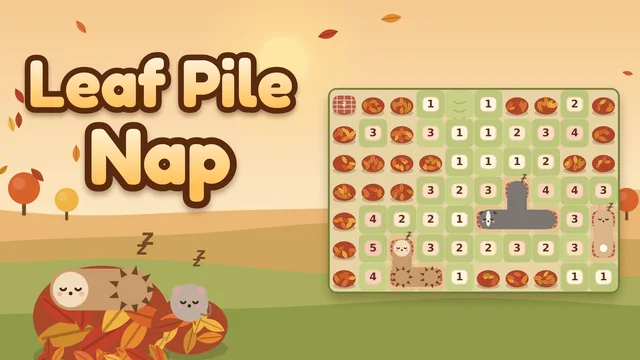
Linden Meadow Minesweeper is minesweeper with the standard rules, set in a hay meadow at the end of a summer afternoon, under an old linden tree by a dry-stone wall. Before the hay is cut, Ambrose, a field vole of some years in an oatmeal cardigan and wire spectacles, maps every bumblebee nest so the mower can go round them. The nests are the mines. Dig a patch and it shows how many nests are in the eight patches around it; a patch with none opens its neighbors for you. Flag the nests you can prove, dig everything else, and the meadow is surveyed. The three classic sizes are here (Beginner 9 by 9 with 10 nests, Intermediate 16 by 16 with 40, Expert 30 by 16 with 99) plus custom boards from 5 by 5 to 30 by 30. No guessing is on by default: before a board is dealt, the game's solver clears it from your first dig using only what a player can see, and a board that would need a guess is never offered. Turn it off for classic dealing. There is a clock for best times, a win streak for each size, and today's meadow, the same board for everyone on a given date.
- No guessing, on by default: every board is checked by a solver that sees only the numbers and the counter, and is kept only if it can be cleared from the first dig without a single guess. Classic dealing is one switch away in Settings.
- All three ways to flag: right-click, a long press on a phone or tablet (a ring fills around the patch, then the flag goes down), or the Dig and Flag switch on the shelf, which makes a plain tap flag.
- Chording: dig a number that has all its flags around it and every other patch around it is dug at once. Pressing a number shows which patches it would dig.
- Expert on a phone turns to 16 across by 30 down, with one-finger panning, pinch zoom and a Fit button to see the whole board.
- A Hint that points at a patch you can prove safe and says why, or, on a classic board where nothing can be proven, at the patch least likely to hold a nest, with its chance.
- A clock, best times and win streaks for each size, today's meadow with a streak of days, and a retry of the same board after a woken nest, as practice. Everything saves on this device.
Tips worth knowing
- Start with the 1s on the edge of a dug stretch. A 1 with only one undug patch beside it has its nest right there.
- Learn the 1-2 pattern: where a 1 and a 2 sit side by side along a straight edge of undug patches, the undug patch just past the 2 holds a nest, and the one just past the 1 is clear.
- When a number already touches as many flags as it shows, every other patch around it is clear. Chord it to dig them all at once.
- Look at the counter near the end. With two nests left and only a few patches undug, the count often settles what the numbers cannot.
- With no guessing on, there is always a patch you can prove safe. If you cannot find one, look again at a pair of numbers side by side, or ask for a hint.
- With classic dealing, a guess is sometimes forced. Prefer the patch the numbers make least likely, and make the guess early rather than after an hour of careful work. The hint shows the safest patch and its chance.
Accessibility
- Everything can be played with a keyboard: the arrow keys move a visible cursor, Space or Enter digs, F flags, H shows a hint, and every button is reachable with Tab.
- The keyboard cursor announces each patch to screen readers, by row and column and whether it is undug, flagged or dug and its number. Game messages are announced as they appear.
- Numbers are bold serif numerals on turned earth, each with its own color, and nothing depends on color alone: a flag is a peg with a pennant and a nest is a round mound with a bee on it.
- Nothing is timed against you: the clock only records your time, and it can be hidden. Large boards can be zoomed up to large patches.
- Reduced motion stops the opening animation, the drifting petals and the circling bees, and keeps every response. Sound is optional and never needed to play.
Questions
What does no guessing mean?
Before a board is dealt, the game's solver plays it from your first dig, seeing only what you would see: the dug patches, their numbers and the nest counter. It proves patches safe with single numbers, pairs of numbers (the 1-2 and 1-1 patterns, for example) and, when those run out, every arrangement of nests along the dug edge that fits the numbers. A board is kept only if the solver clears all of it that way, so you never have to guess. Our regressions test this on every size, and check each of the solver's steps against an exhaustive search.
How often does classic minesweeper need a guess?
We measured it with our own simulation of 1,000 classic boards at each size, with the first dig in the middle (it always opens a stretch, as it does here). A solver that never guesses cleared 92.0 percent of Beginner boards, 70.5 percent of Intermediate boards and 16.1 percent of Expert boards; on the rest it reached a point where no patch could be proven safe. A player who then digs the patch least likely to hold a nest won 97.0 percent of Beginner games, 85.9 percent of Intermediate and 52.1 percent of Expert, against 96.3 percent, 84.2 percent and 39.4 percent for a player who picks any unproven patch at random. These are computer players, not people.
What are the sizes?
Beginner is 9 by 9 with 10 nests, Intermediate 16 by 16 with 40 nests and Expert 30 by 16 with 99 nests, the classic sizes. Custom boards run from 5 to 30 patches on each side. With classic dealing a custom board can hold up to nine fewer nests than it has patches; with no guessing it holds up to 21 percent of its patches (Expert is about 20.6 percent).
How does today's meadow work?
Today's meadow is a 16 by 16 board with 40 nests and no guessing, dealt from the date, so everyone playing on the same day gets the same board. Its first stretch is already dug, so everyone starts from the same place, and the clock starts with your first dig. Your first try each day counts toward your record and a streak of days; you can play it again as practice.
What does the game save?
On this device: your settings, the meadow in progress with its clock, and for each size (and today's meadow) the games played and won, your best time and your current and longest win streak. A win with a hint counts as a win but not as a best time. There is no account.
Guides and roundups
Game details
- Genre
- Cozy Classic
- Difficulty
- Medium
- Session
- A few minutes for Beginner, longer for Expert, saved as you go
- Inputs
- Keyboard, Mouse, Touch
- Devices
- Desktop, Tablet, Mobile
- Made by
- CozyWorld
- Updated
- 2026-10-31
A calm logic puzzle with no purchases, accounts or ads in the game. The bumblebees grumble and settle; nothing is hurt.