Cozy Puzzle game
Harvest Grid
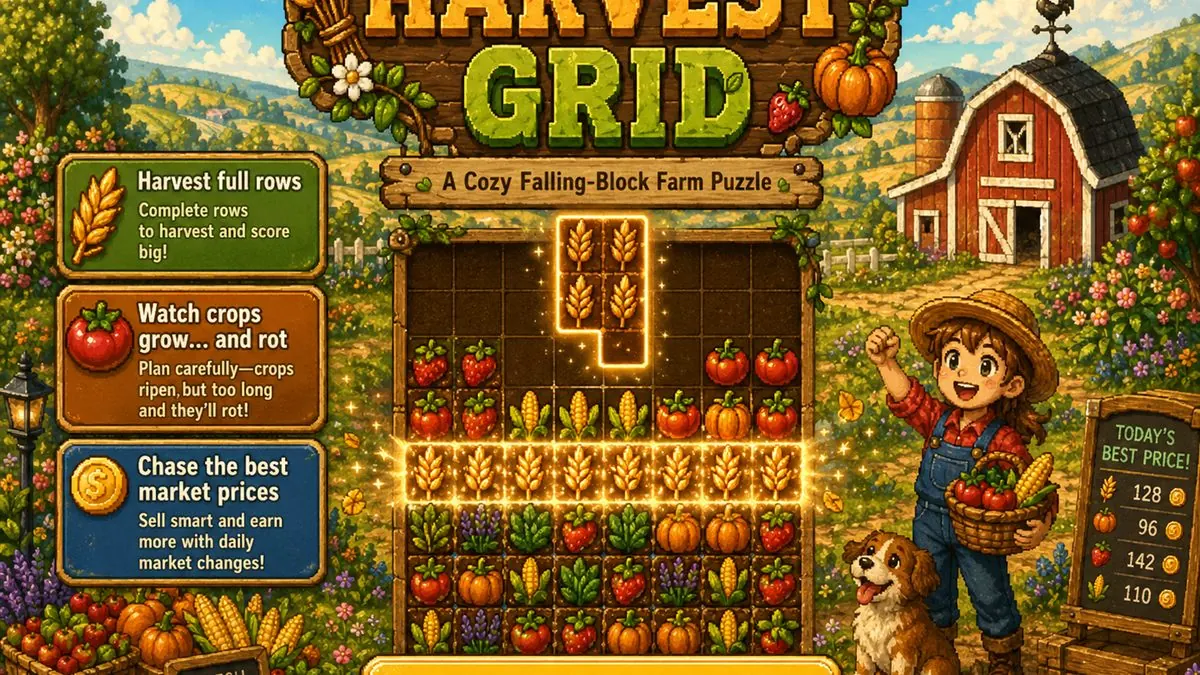
Harvest Grid is a free free falling crop puzzle game you can play directly in your browser on CozyWorld. A cozy falling-block farm puzzle where patience grows better crops, but too much patience makes soup nobody asked for. The round centers on this objective: fit falling crops into tidy rows and harvest the good vegetables before they go soft. The first decision is usually to move and rotate the falling crop piece before it lands. From there, fill every tile in a horizontal row to harvest that row so the game stays readable even when the pace changes. Harvest Grid has a medium challenge level and usually fits into 3-8 minutes, which makes it useful for a focused cozy break. This guide covers the objective, controls, scoring, difficulty curve, and practical tips before you press play.
Quick details
- Genre
- Cozy Puzzle
- Play style
- free falling crop puzzle game
- Difficulty
- Medium
- Session length
- 3-8 minutes
- Controls
- Keyboard, Mouse
- Best played on
- Desktop
- Best for
- farm tetris game
- Last updated
- 2026-04-29
What Is Harvest Grid?
Harvest Grid is a falling crop puzzle played on a tall farm board where every vegetable has its own little clock. Drop crop pieces into neat rows, wait just long enough for them to ripen, then harvest before the field turns into compost with regrets. Harvest Grid gives players a clear objective, visible feedback, and a theme that changes how each move feels. The round stays easier to read when you know what to watch for: falling crop pieces built for a few calm minutes. Row harvests with a farm twist. Crops age while you play, turning from young sprouts to prime harvests to rot. Fresh, mature rows feel better than frantic clears. Next-piece preview, ghost drop preview, soft drop, hard drop, and rising speed. Use this page to understand the game before you press play, then jump in for a few calm minutes.
How to Play Harvest Grid
Start Harvest Grid by checking the visible goal and making the opening move: move and rotate the falling crop piece before it lands. Fill every tile in a horizontal row to harvest that row.
During a Harvest Grid session, watch the little cues the game puts in front of you: falling crop pieces built for a few calm minutes. row harvests with a farm twist. A cleaner round usually comes from noticing those cues early instead of rushing the first available action.
Old crops rot over time and clear for zero points. The run ends when new crops can no longer enter the board. Use restart when you spot a better route, want a cleaner score, or simply want another short round with the same rules fresh in mind.
Controls
Harvest Grid is not primarily tuned around touch input, so desktop play is the safer choice when you want precise control.
Keyboard players can use the listed Harvest Grid keys where the game supports them: Keyboard: A/D or left/right arrows move the crop piece. Keyboard: W, R, or up arrow rotates the crop piece. Keyboard: S or down arrow soft drops. Keyboard: Space hard drops. Use the toolbar restart button to restart.
On desktop, Harvest Grid gives you the most precise pointer and keyboard control. On phone, keep sessions short and use the orientation that gives the play area the most room.
- Keyboard: A/D or left/right arrows move the crop piece.
- Keyboard: W, R, or up arrow rotates the crop piece.
- Keyboard: S or down arrow soft drops.
- Keyboard: Space hard drops. Use the toolbar restart button to restart.
Scoring and Goals
Harvest Grid rewards steadier play through the goals the game shows on screen. One useful scoring habit is: Do not always hard drop immediately. Crops need a little time to mature. Mistakes are easiest to recover from when you notice the feedback immediately, restart quickly when needed, and use the visible controls instead of fighting the browser.
Difficulty Notes
Harvest Grid becomes more demanding as the game starts to test this advice: Strawberries rot quickly, so clear them earlier than pumpkins. The difficulty is listed as Medium, but the practical challenge is learning which cue to trust first and when a slower move gives you a better result.
Why It Feels Cozy
Harvest Grid fits CozyWorld because it keeps the goal readable while giving the theme room to matter. A cozy falling-block farm puzzle where patience grows better crops, but too much patience makes soup nobody asked for. The short session length makes it feel like a break rather than a commitment, and the best moments come from noticing a detail, choosing a calmer move, or improving one specific part of your previous run.
Tips to Get a Better Score
- Do not always hard drop immediately. Crops need a little time to mature.
- Strawberries rot quickly, so clear them earlier than pumpkins.
- Multi-row clears add a bonus, but rotten crops in the row are worth nothing.
- Use the ghost preview to place awkward shapes cleanly.
- As speed rises, keep the top of the board open for larger pieces.
Best screen setup
Harvest Grid can be played on desktop, but it is best when the screen gives this particular play area enough room. Desktop is the safest pick for precision, while tablet and phone sessions can still work for short rounds.
Who should play Harvest Grid?
- Players who want a medium cozy puzzle game without installing an app.
- Cozy game fans looking for farm tetris game and a clear short-session goal.
- Casual players who like visible instructions, quick restarts, and browser play.
- Anyone who wants a game that fits 3-8 minutes instead of a long campaign.
Related Cozy Games
If Harvest Grid fits your mood, these CozyWorld games are good next stops.
Toasty Tile Flip
Flip warm breakfast tiles, remember each treat, and match every cozy pair on the tray.
Play Toasty Tile FlipCat Cafe Drop
Drop cafe treats, cat tokens, and warm drinks into a cozy pile, merge matching items, and serve quick customer orders.
Play Cat Cafe DropCozy Co-Workers
Pick one friendly applicant each week, choose their role tile, and hire the right team shape for festival week.
Play Cozy Co-Workers FAQ
Show questions
Is Harvest Grid free to play?
Harvest Grid is free to play on CozyWorld. Open the play page and settle in. There is no account, download, or purchase step attached to the game.
Can I play Harvest Grid without downloading an app?
Yes. Harvest Grid opens in a modern browser with no app download. If the game does not open, check that browser scripts are enabled and try refreshing.
Is Harvest Grid good on tablet?
Harvest Grid can run on supported tablet browsers, but desktop may feel more precise for this control scheme. Use the recommended orientation and choose short sessions when the board or action feels dense.
What do you do in Harvest Grid?
In Harvest Grid, the main objective is to fit falling crops into tidy rows and harvest the good vegetables before they go soft. A useful starting rule is: Do not always hard drop immediately. Crops need a little time to mature. Strawberries rot quickly, so clear them earlier than pumpkins.
Is Harvest Grid safe for casual play?
Cozy farming puzzle play with crop rot. No violence, accounts, purchases, chat, or user-generated content. Harvest Grid is a single-player browser game with no public chat or user-generated content.
Update notes
2026-04-29: Reworked Harvest Grid into a falling crop puzzle with row harvests, crop aging, rot, and better-timed clears.
Play notes
The game can be paused from the shared play toolbar. Instructions and controls are available as page text outside the canvas. Keyboard controls are supported for active play. The play page also keeps pause, restart, and helpful instructions close by where the game supports them.